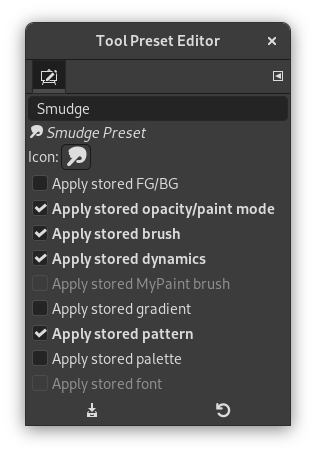
You can access this dialog through:
-
a click on the
 button
in the button bar of the
Tool Presets Dialog.
-
a double-click on a preset icon in the Tool Presets Dialog.
-
a right-click on a preset in the Tool Presets Dialog to open a context menu and then click on the Edit Tool Preset command.
-
a click on the Save Tool Preset… button from the Tool Options Dialog.
You can edit presets you have created only; all options of predefined presets are disabled. When you save a preset, it is stored in the first writable folder configured under Tool Presets in the Folders Preferences.
In this dialog you can:
-
edit preset name in text box,
-
change preset icon by clicking on preset icon. This opens a window where you can choose a new icon.
-
select resources to be saved by clicking on check boxes.
The button bar at the bottom offers the following functionality:
-
 Save the settings of the current tool preset.
-
 Reset if you want to undo your changes.
The Tool Preset Editor has a context menu that can be reached by clicking
the tab menu button
 and then choosing
. Besides two items
that do the same as the save and restore buttons mentioned above, it
only has one other option.


