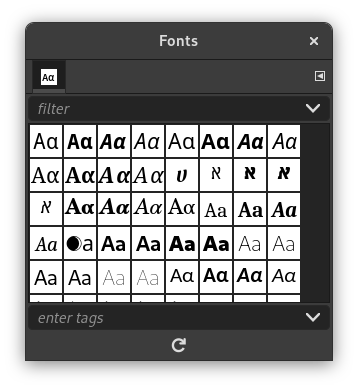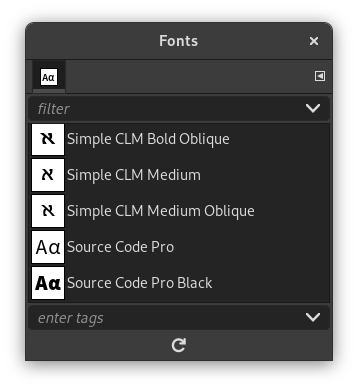
The “Fonts” dialog is used for selecting fonts for the Text tool. It also allows you to refresh the list of available fonts, if you add new ones to your system while GIMP is running.
This dialog is a dockable dialog; see the section Section 2.3, “Dialogs and Docking” for help on manipulating it.
You can access it:
-
from the main menu: → → ;
-
from the Tab menu in any dockable dialog by clicking the tab menu button
 and selecting
→ ,
-
from the Tool Options for the Text tool. If you click on the “Font” button, a Font-selector pops up. In the lower right corner is a button that, if pressed, brings up the “Fonts” dialog.
In the menu, there is a list of detached windows which exists only if at least one dialog remains open. In this case, you can raise the “Fonts” dialog from the main menu: → .
The most basic thing you can do is to select a font by clicking on it: this font will then be used by the Text tool. If instead of clicking and releasing, you hold down the left mouse button with the pointer positioned over the font example (“Aa”), a window showing a larger text example will pop up (“Pack my box with five dozen liquor jugs”).
- Grid/List modes
-

Tip Ctrl+F opens a search field. See View as List
In the Tab menu for the Fonts dialog, you can choose between and . In Grid mode, the fonts are laid out in a rectangular array. In List mode, they are lined up vertically, with each row showing an example of the appearance of the font (“Aa”), followed by the name of the font.
- Buttons
-
The button bar at the bottom offers the following functionality:
-
 Refresh font list
-
Pressing this button at the bottom of the dialog causes the system font list to be rescanned. This may be useful if you add new fonts while GIMP is running, and want to make them accessible for the Text tool. You can also cause the font list to be rescanned by right-clicking in the font display, and selecting “Rescan Font List” from the menu that pops up (it is actually the only option in the menu).
Tip You can change the size of the font previews in the dialog using the “Preview Size” submenu of the dialog's Tab menu.
-