This submenu contains some Script-Fu commands, especially the Script-Fu console. Script-Fu is a language for writing scripts, which allow you to run a series of GIMP commands automatically.
The Script-Fu console is a dialog window where you can interactively test Scheme commands.
The console consists of a large scrollable main window for output and a text box at the bottom to enter Scheme commands. When you type a Scheme statement and then press the Enter key, the command and its return value will be displayed in the main window.
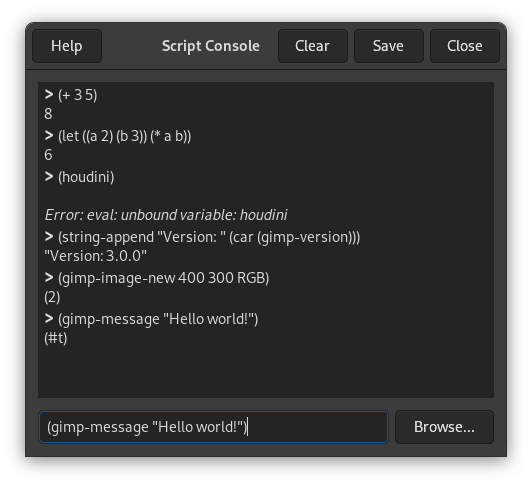
You will find more information about Scheme and examples how to use the Script-Fu console in Section 3, “A Script-Fu Tutorial”.
The Script-Fu Console Buttons
- Browse
-
The button is next to the Scheme commands text box. When clicked, the procedure browser window opens with an additional button.
Select a PDB procedure from the list and press the button. The selected procedure and its parameter names will be pasted into the text box of the Script Console.
Now you just have to replace the parameter names after the procedure name with actual values. Then you can call the procedure by pressing Enter.
- Close
-
Pressing this button closes the Script-Fu console.
- Clear
-
When you click on this button, the content of the main window will be removed. Note that you can't get back the removed content using the Save command.
- Save
-
This command lets you save the content of the main window, that is the Script-Fu console output (including the “
>”-characters).
This command will start a server, which reads and executes Script-Fu (Scheme) statements you send it via a specified port.
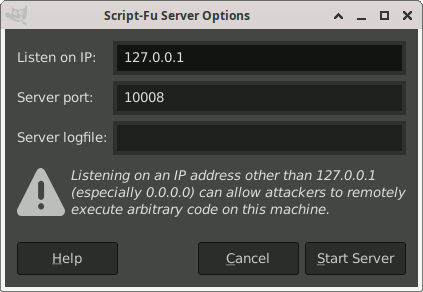
- Listen on IP
-
The IP address the Script-Fu server will listen on. This is usually 127.0.0.1 (also known as localhost). Only change this if you know what you are doing.
- Server Port
-
The port number where the Script-Fu server will listen. It is possible to start more than one server, specifying different port numbers, of course.
- Server Logfile
-
Optionally you can specify the name of a file the server will use to log informational and error messages. If no file is specified, messages will be written to stdout.
The Script-Fu Server Protocol
The protocol used to communicate with the Script-Fu server is very simple:
-
Every message (Script-Fu statement) of length
Lsent to the server has to be preceded with the following 3 bytes:Table 16.1. Header format for commands
Byte # Content Description 0 0x47 Magic byte ('G') 1 L div 256 High byte of L2 L mod 256 Low byte of L
-
Every response from the server (return value or error message) of length
Lwill be preceded with the following 4 bytes:Table 16.2. Header format for responses
Byte # Content Description 0 0x47 Magic byte ('G') 1 error code 0 on success, 1 on error 2 L div 256 High byte of L3 L mod 256 Low byte of L

|
Tip |
|---|---|
|
If you don't want to get your hands dirty: there is a Python script named servertest.py shipped with the GIMP source code, which you can use as a simple command line shell for the Script-Fu server. |


